Trick-or-Treat Kids Digital Paper
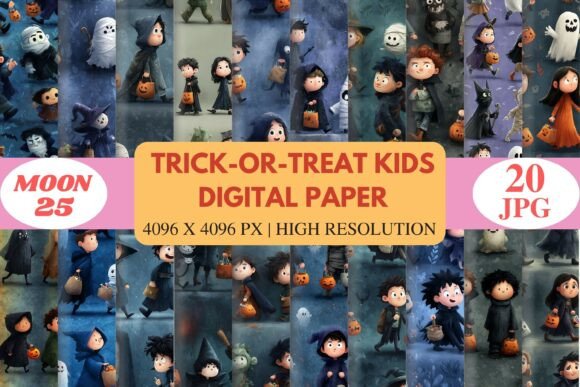
Trick-or-Treat Kids Digital Paper is a vibrant collection of high-resolution images that bring the magic of Halloween to life. Each design features adorable children in charming costumes, whimsical pumpkins, and playful ghosts, all set against cozy, spooky backdrops. The soft storytelling style and cute characters make this set ideal for a wide range of creative projects, from kids' crafts to seasonal artwork.
The digital papers are crafted in 4096 x 4096 pixels, ensuring crystal-clear details and rich colors that stand out on both digital and print media. Whether you're working on social media graphics, stationery, or print-on-demand products, these designs offer a professional touch that elevates any project.
Why Trick-or-Treat Kids Digital Paper Stands Out
This collection captures the essence of Halloween with a warm, inviting aesthetic. The illustrations blend playful elements with a touch of nostalgia, making them perfect for family-friendly and kid-themed designs. The visual appeal lies in the balance between spooky and sweet, creating a unique atmosphere that resonates with both children and adults.
Each image is designed with attention to detail, featuring smooth textures and vibrant color palettes that add depth and dimension. The high-resolution format ensures that every element remains sharp and clear, even when scaled up for larger projects.
Where to Use Trick-or-Treat Kids Digital Paper
Trick-or-Treat Kids Digital Paper is incredibly versatile, making it a valuable addition to any designer's toolkit. It works well in a variety of applications, including scrapbooking, memory pages, and Halloween invitations. The set includes 20 JPG files, which are easy to integrate into popular design programs like Photoshop, Canva, Procreate, and Illustrator.
For marketers and content creators, these digital papers can be used as backgrounds for social media posts, banners, or email templates. Their playful nature makes them ideal for engaging audiences during the Halloween season. For small business owners, the set offers a way to create eye-catching packaging, stickers, or promotional materials that align with a festive theme.
In editorial design, these papers can serve as decorative patterns or background elements that enhance the visual storytelling of a publication. They also work well in web design, where they can add a unique flair to landing pages or blog posts focused on seasonal themes.
Designing with Trick-or-Treat Kids Digital Paper
When incorporating Trick-or-Treat Kids Digital Paper into your projects, consider how the visual elements complement your overall design. The soft, storytelling style pairs well with clean, modern typography, creating a balanced look that’s both engaging and professional. For a more whimsical feel, you might pair the paper with a handwritten or script font to emphasize the playful nature of the design.
Readability is an important factor when using these papers as backgrounds. If text will be overlaid, ensure there's enough contrast between the paper's colors and the text to maintain clarity. Testing different color combinations and layouts can help you find the best fit for your specific project.
From a branding perspective, using Trick-or-Treat Kids Digital Paper consistently across marketing materials helps reinforce brand identity. It creates a cohesive look that aligns with the playful and magical vibe of Halloween, making it easier for audiences to recognize and connect with your brand.
Practical Tips for Using Trick-or-Treat Kids Digital Paper
To get the most out of this set, start by evaluating your project needs. Are you creating something for personal use, like a Halloween card or craft project? Or are you designing for commercial purposes, such as print-on-demand products? Understanding your goals will help you choose the right elements from the collection.
Testing font pairings is another key step. If you’re using the paper as a background, consider how different fonts interact with the visuals. A sans-serif font might provide a clean, modern contrast, while a script font could add a more personalized, handcrafted feel.
Reviewing the included styles is also essential. The 20 JPG files offer a range of options, so take time to explore each one and determine which best suits your design. Pay attention to the composition, color schemes, and overall mood of each paper to ensure it aligns with your vision.
Finally, always check the licensing terms before using the digital papers in commercial projects. This ensures that you’re compliant and can confidently use the assets without legal concerns.